Admin User Interface
Flows
The Flows area is a visual workflow designer where you can create automated processes using flow-based programming. This approach is similar to visual scripting tools like Unity’s Visual Script. By default, this area is hidden in the burger menu.
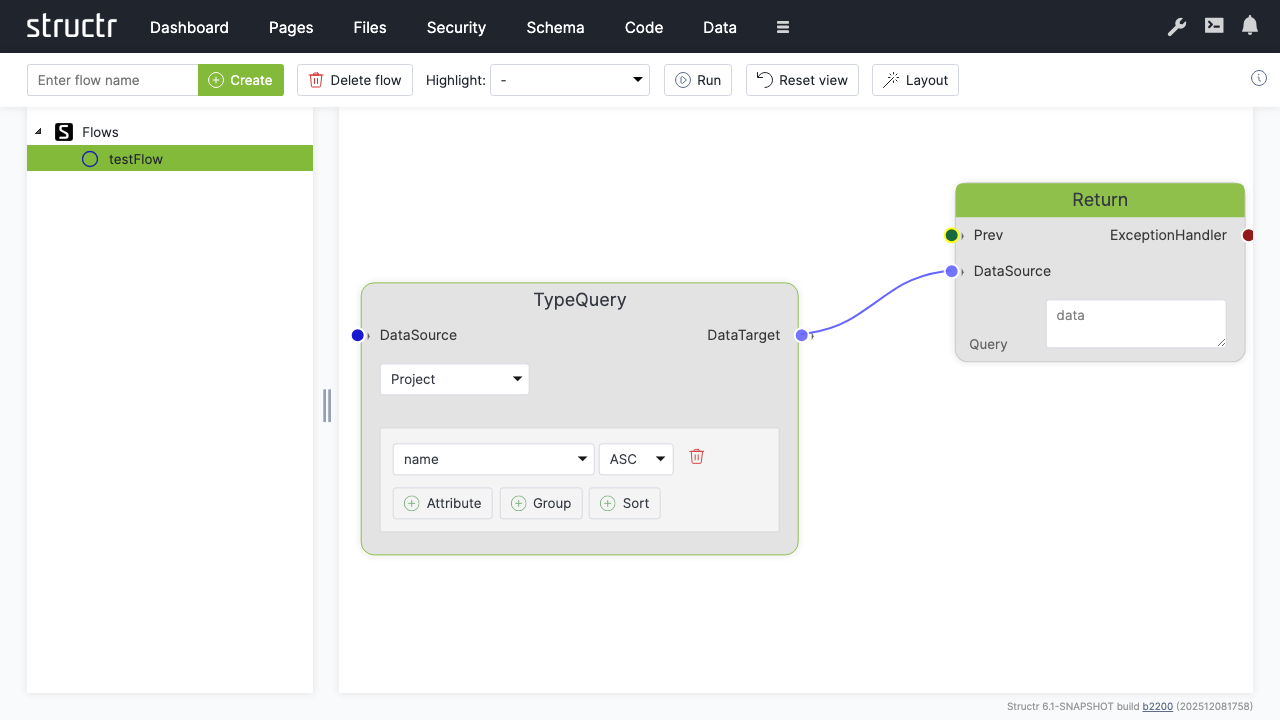
Secondary Menu
Create Flow
An input field and Create button on the left let you create a new flow. A flow is a container for flow nodes that you connect to define a process.
Delete flow
Deletes the currently selected flow.
Highlight
A dropdown that highlights different aspects of your flow: Execution Flow, Data Flow, Logic Flow, or Exception Handling. This helps you focus on specific channels when working with complex flows.
Run
Executes the current flow.
Reset view
Resets the canvas zoom and pan position.
Layout
Automatically arranges the flow nodes on the canvas.
Left Sidebar
The sidebar shows a tree of all flows in your application. Click on a flow to open it on the canvas.
The Canvas
The main area displays the flow nodes and their connections. You can zoom and pan the canvas to navigate larger flows.
Adding Nodes
Right-click on the canvas to open the context menu, which lets you add new nodes. The menu is organized into categories:
Action Nodes
Action, Call, ForEach, Aggregate, Filter, ExceptionHandler, Log, Return. The Fork and ForkJoin nodes exist in the editor but are currently disabled in the context menu.
Data Nodes
Datasource, Constant, CollectionDatasource, ObjectDatasource, KeyValue, ParameterInput, ParameterDataSource, Store, GetProperty, First, TypeQuery
Logic Nodes
Decision, Not Null, Not Empty, Not, Or, And, Is True, Comparison, Script Condition, Switch, Switch Case
Actions
Execute Flow, Reset View, Select and Apply Layout
Connecting Nodes
Each node has input and output connectors. You connect nodes by dragging from an output connector to an input connector. The connectors are color-coded by channel type:
- Green – Execution channel (controls the order of operations)
- Blue – Data channel (passes data between nodes)
- Red – Exception handling channel (handles errors)
- Orange: Logic channel (passes boolean values); an unconnected condition socket is shown in a darker ochre
You can only connect connectors of the same type.
Related Topics
- Flows – Detailed documentation on flow-based programming, node types, and building workflows